Bokeh (pronounced Bo Ka) is the blur, or the aesthetic quality of the blur, in out-of-focus areas of an image, or "the way the lens renders out-of-focus points of light." Source Wikipedia
to get an idea of what that means, it looks like this. source
Keep the Christmas theme in mind.....
If your internet allows you watch this 6 minute video..... it explains the set up on camera, the subject and the lighting and finishes with examples. It's actually fairly easy.
For those not on fast www. I'll try to make it easy and not long winded.
Basically you need a subject that will be in sharp focus in the foreground and a set of lights arranged in whatever way you like in the background.
Turn off auto focus and turn off VR/IS. Turn off flash
Turn your dial onto AV. In this setting you control the fstop (the aperture which gives you the depth of field), the camera will set the shutter for you depending on the available light.
Put the camera on a tripod, the table top, a chair will do just as well.
Set the camera's f stop on it's largest possible aperture, which is the smallest f stop number. ie.f2.8. If you have a 50mm f1.8 or f1.4 lens even better. Point and shoot cameras set on macro.
For zoom lenses, zoom out to about 50mm. You'll find that number on the top part of your lens on a ring that goes around the lens.
Set your ISO to its smallest number. mine's 50. Most Canon's by default is ISO100. Not sure of Nikon. If you find your shots are too dark, bump up the ISO, not your aperture {fstop} Probably somewhere around 200 should do the trick.
I'd use your 2 second delay timer as the shutter will be fairly slow, to minimize the risk of the camera blurring the shot. If you have a remote control, go for it.
set your white balance to incandescent (light bulb) setting to get the right colour tones in your final images.
You can find another explanation of setting it all up here. It talks of the same things to do with different wording. Fair chance if you are uncertain of something I've written, you'll understand it from the other site.
I haven't done my shots yet (only put the lights on the tree tonight with the kids) but these are some wonderful examples to get the creative juices flowing. Keep in mind the Christmas theme for this tutorial!!
for more eye candy and ideas go to Google Images and type "Bokeh photography"
I suggest you print this tute out (do it in BW to save colour ink on those large examples, sorry about them being so large, I wasn't able to reduce these} and put them in your folder along with the other tutes you may have printed out.
YOUR CHALLENGE SHUTTERBUGS IS go all Bokeh on me. This is fairly simple, straight forward exercise, and can be done in the home at anytime of day, and in any weather.
Place your THREE best shots of Christmas, whether they are lead up shots to the big day, or from your Christmas day into(All Things Christmas - Tiff's Christmas Photo Challenges in the November/Dec challenges folder to be in the running for the Scrap Therapy voucher. I'll get back to you on the exact dates of when this closes (being the Mad Christmas Season and all.)
Have fun with the Festive Season and enjoy it via the view finder.
my camera is dead and I want to cry! - I love this effect but it will be the very very first thing I play with when I get my new Camera - thanks again for a fantastic tut Tiff
It was all quiet in the house. No one was awake, not even a mouse!
xcept me
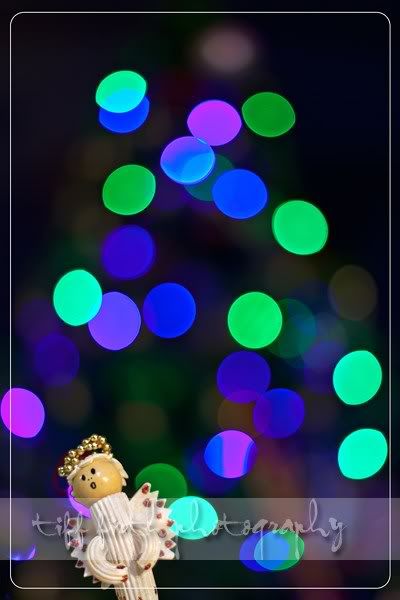
so I pulled the Christmas tree into a doorway, set up the camera on my kitchen table in the adjoining room on a couple of encyclopedias (I bet the kids these day have no concept of these books ) and used a spot light to light up the angel. (she's made of pasta by the way)
set up my subject in the near foreground
and captured this
and this
and discovered that about a third of my LED's arent working ( a new string of lights too and of course I didn't keep the reciept )
i bought new lights yesterday, thought id surprise the kids... but they dont work , got DH to look thinking id done soemthign wrong (even though i was sure it wasnt that hard!) and nope thye dont work. and its a 75km drive from here
I reckon I'm going to ask the checkout person to actually open the box and plug them in to a power point to ensure they are working from now on!!
on an upside (for me) I found the receipt for my 'half a string not working' ones, but now I need to get them to the shop. And I didn't keep the packaging. I had them wrapped around a electrical conduit plastic reel (like a really large cotton reel.
I reckon I'm going to ask the checkout person to actually open the box and plug them in to a power point to ensure they are working from now on!!
on an upside (for me) I found the receipt for my 'half a string not working' ones, but now I need to get them to the shop. And I didn't keep the packaging. I had them wrapped around a electrical conduit plastic reel (like a really large cotton reel.
that's a really good idea, Tiff! Will keep that in mind when I replace my lights.
_________________ Blessings, Julia (in New Zealand)
Users browsing this forum: No registered users and 0 guests
You cannot post new topics in this forum You cannot reply to topics in this forum You cannot edit your posts in this forum You cannot delete your posts in this forum You cannot post attachments in this forum





 If you find your shots are too dark, bump up the ISO, not your aperture {fstop} Probably somewhere around 200 should do the trick.


 ) and used a spot light to light up the angel. (she's made of pasta by the way)

 ( a new string of lights too and of course I didn't keep the reciept


 , got DH to look thinking id done soemthign wrong (even though i was sure it wasnt that hard!) and nope thye dont work. and its a 75km drive from here


